TEMPO-1 2.0: Turn Beats into Songs
Arrange eight tracks of Patterns, audio, and hosted AUv3 instruments. TEMPO-1 2.0 adds Song recording and editing, clip banks, EQ and inserts, automation, portable projects, and WAV mix/stem export.
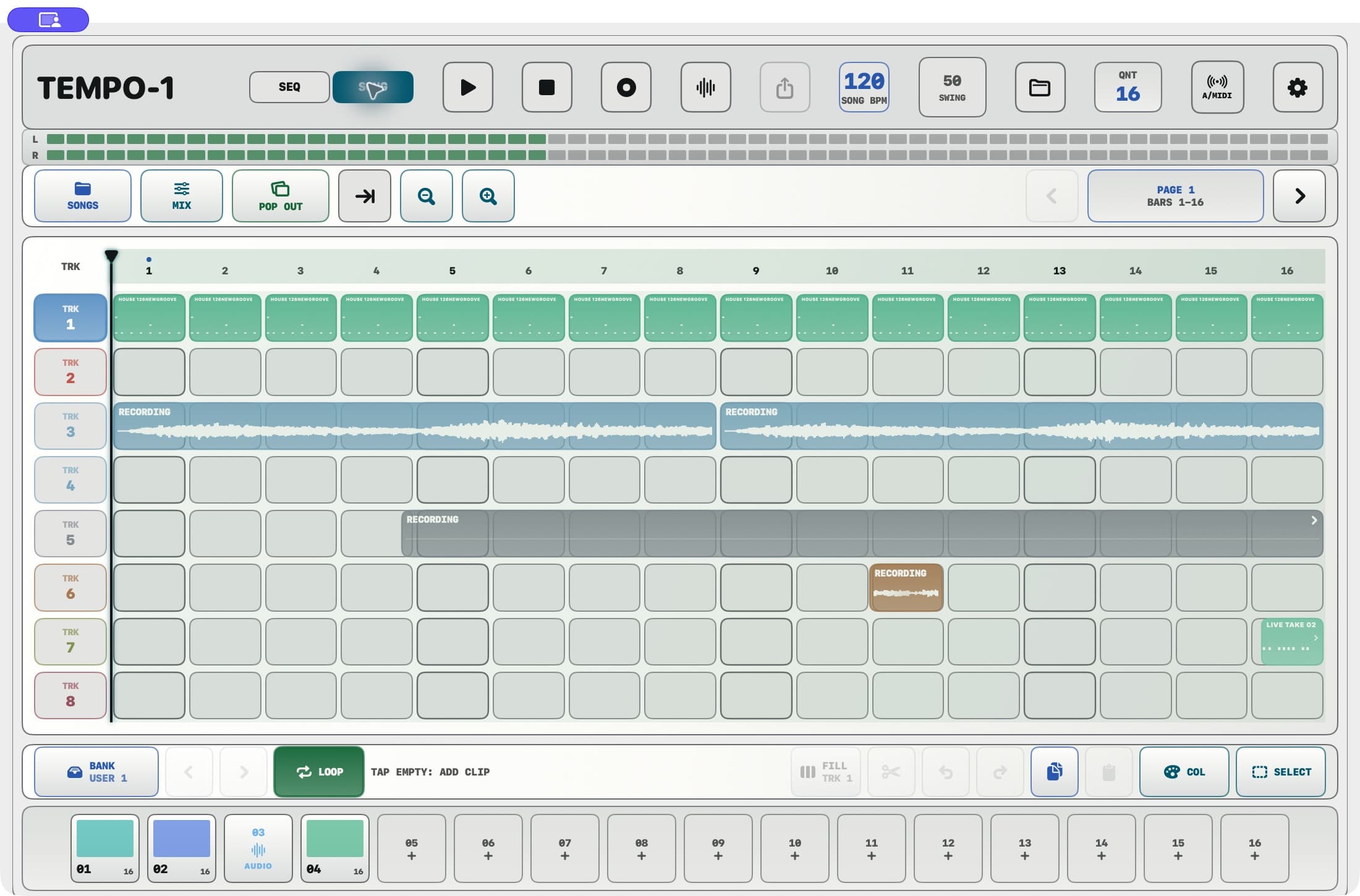
TEMPO-1 2.0 is available on the App Store. The update takes its hands-on 12-voice groovebox into an eight-track Song workspace in the standalone app, with practical ways to capture an idea, arrange it, save it, and move it into a full DAW.
The familiar pads, 64-step sequencing, live sampling, per-step groove controls, MIDI output, and TEMPO-1 AUv3 extension remain part of the instrument. Song arrangement, hosting other AUv3 instruments, and direct audio-input recording run in the standalone app.
Start with a Pattern, then build a Song
Open SEQ to create a beat, then SONG to arrange it. Choose a Pattern in BANK, select a track, and tap an empty bar to place it. Stack Patterns, recorded audio, and Instrument MIDI across eight tracks. The bundled example arrangement gives you an intro, verse, break, chorus, and outro to explore.
Move, split, copy, colour, and repeat material to build variations. Zoom into a detail or out to the whole arrangement, use ruler selections for a section, and try changes with Undo/Redo. FILL places whole copies in empty gaps on the selected track across the visible bars or ruler selection; existing clips stay in place.
A single track-header tap selects the track. Double-tap the header to open its mixer. The Song timeline supports arrangements up to 30 minutes.
Follow the Song arrangement guide
Record audio and edit the take
Set a Song track to Audio, choose the microphone or interface input in I/O, check the level, arm the track, and record. Double-tap the resulting clip to work with the waveform, source region, gain, fades, and repeats.
Import WAV, MP3, M4A, or AAC audio into the Song or reusable bank. Song audio can be longer than a pad sample: the groovebox's pad samples still have a 30-second limit, while Song material follows the arrangement's 30-minute limit.
Edit waveforms, fades, and repeats
Add an instrument and capture MIDI
Choose Instrument for a Song track and select an installed compatible AUv3 instrument. Arm the track or use TAP TO PLAY to monitor it, record a performance, and arrange the take alongside your beats and audio. For plug-in on-screen keys that do not send MIDI back, use AUDIO or MIDI+AUDIO capture. Hosted instrument state belongs to the Song; live playback needs the same plug-in on the destination device, while a printed audio take can play without it.
Recorded Pattern/MIDI takes can be edited on TEMPO-1's 12-voice step grid. Instrument takes use a performance editor for hosted parameter automation.
Use Song instruments and MIDI recording
Mix the arrangement and add movement
Open Song MIX for level, pan, mute, solo, and three-band EQ on track and master strips. Each strip has four ordered internal insert slots. Choose Delay, Reverb, Modulation, Filter, Slicer, or Compressor; the Modulation module includes Phaser, Chorus, and Flanger. The master can use a Limiter in its final slot.
Record and edit automation to shape the arrangement over time, including a tempo lane for Song BPM changes. Sequence AUTO continues to serve the Pattern workflow.
Learn Song mixing and automation
Keep ideas in the bank and save the Song
The shared Pattern and clip BANK keeps reusable material close. Save takes for another arrangement, audition saved clips, or bounce material to audio for reuse. Pattern/clip banks, preset banks, and Songs have different jobs: Patterns stay global, while the Song holds its arrangement and project state.
The working Song autosaves. Open SONGS to manage named projects and use EXPORT SONG / IMPORT SONG for a portable package with the Song's audio. Keep an exported backup before reinstalling the app or clearing its data.
Export a mix or hand off stems
In SONGS, open the Song you want and choose EXPORT WAV. Render a 16-bit or 24-bit stereo mix or per-track WAV stems, using Entire Song, Loop, or Selected Range and the available effect-tail options. The existing current-loop WAV, current-pattern MIDI, and live capture workflows remain available too.
An external hardware instrument sends its sound through audio, not MIDI. Record its return onto an Audio track before WAV export so the sound is included.
Choose your workspace
Standalone navigation now centres on PADS, SEQ, and SONG. Find MIX, FX, and AUTO under Sequence, and the library through Song's BANK. The settings gear groups appearance, performance, audio/MIDI, and help.
Choose from Graphite, Porcelain, Studio Gray, Midnight, Moss, Aubergine, Sandstone, and Rosewood. Settings also includes Focus Step Lane, Performance Haptics, screen-awake behaviour, launch workspace, metronome level, the welcome guide, and diagnostic reports. Reset Settings preserves your music; Full Factory Reset is a separate confirmed action.
Eligible playback-only Pattern and Song sessions can continue when the app moves to the background. Finish recording and turn off ARM and live input monitoring first; external MIDI sessions do not use this listening mode. After a call or audio interruption, return and press Play to resume.
Explore Settings and background playback
Availability and documentation
TEMPO-1 2.0.0 is $9.99 USD as a one-time purchase, with no subscription or in-app purchases. It runs on iPhone and iPad with iOS/iPadOS 17+, and Mac with macOS 14+. The release is iOS/iPadOS build 42 and Mac build 43.
TEMPO-1 and VA-1 are also available together for $14.99 USD, saving $4.99 USD compared with buying both separately. In standalone TEMPO-1 Song, you can use the compatible VA-1 AUv3 instrument on an Instrument track.