Interface Overview
Find transport, sequencing, voice editing, effects, mixing, and presets.
Main working areas
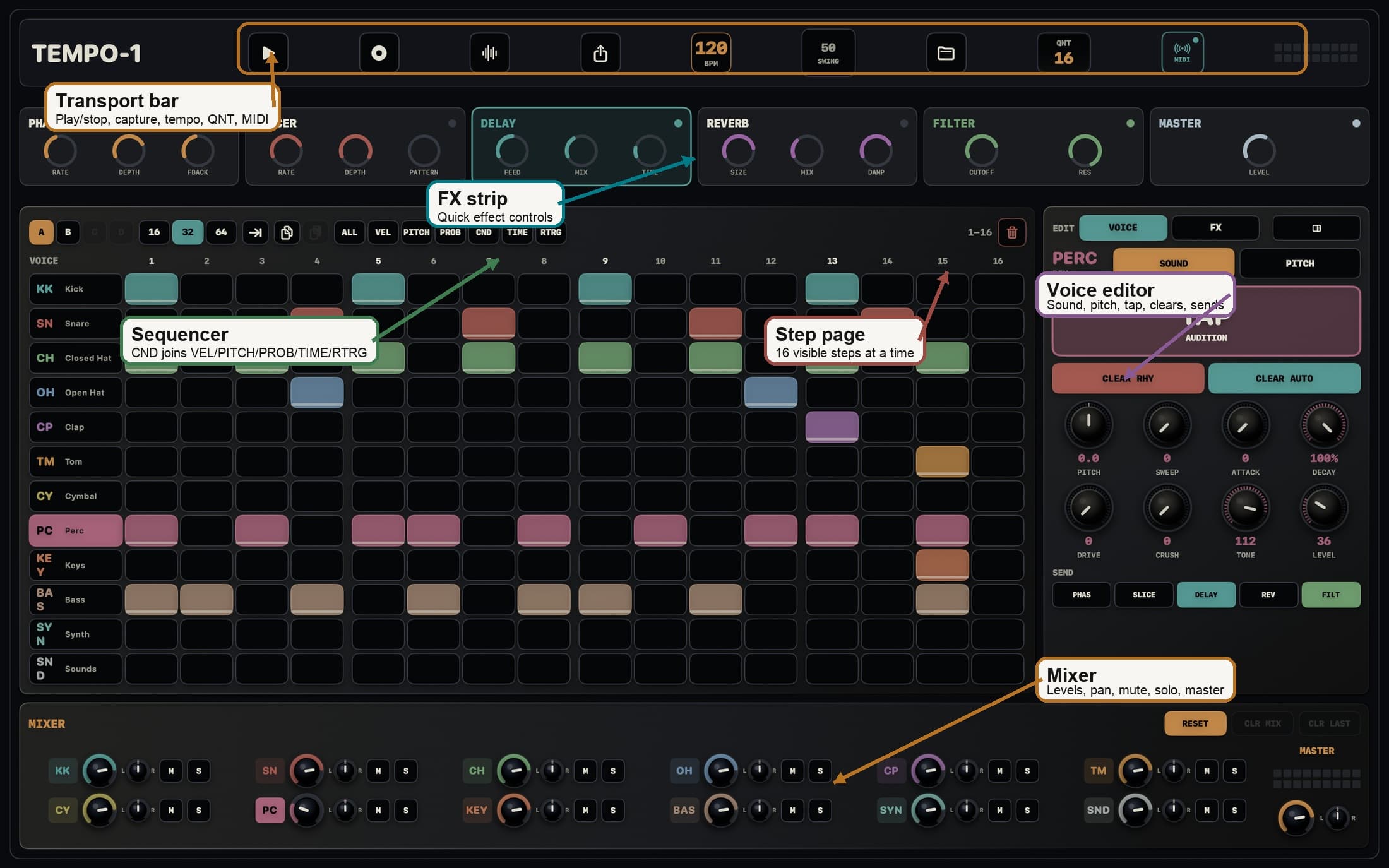
| Area | Purpose |
|---|---|
| Transport | Play/stop, capture, tempo, swing, QNT record quantize, MIDI, and output meter |
| Sequencer | Program steps and edit VEL, PITCH, PROB, CND, TIME, and RTRG |
| Voice editor | Audition, sound select, pitch, clear rhythm or automation, and route sends |
| FX strip | Fast access to Phaser, Slicer, Delay, Reverb, Filter, and Master |
| Mixer | Balance voices, pan, mute, solo, master mute, and clear mixer automation |
Main tabs
- iPhone, iPad, and compact Mac windows use Pads, Seq, Mix, FX, and Presets tabs.
- Large Mac windows use an integrated surface with the sequencer, voice editor, effects, and mixer visible together.
- Pads plays voices and edits sounds. Seq programs steps and step values.
- Mix balances voices. FX handles routing and effects. Presets handles saving, import, export, and reset.